Introduction – You Don’t Have to Show Your Face to Build a Serious Channel
Let’s be honest. Not everyone wants to sit in front of a camera, fix their hair, and record 10 takes to say something useful. And that’s completely fine.
Faceless YouTube channels are among the fastest-growing content models right now, and the best AI tools for YouTube automation have made them more practical than ever. You can write a script, generate a voiceover, build a video, and publish it all in a single afternoon without recording a single second of yourself.
But here’s the thing most people get wrong: they think one tool does everything. It doesn’t. The creators who are actually making money with YouTube automation are using a stack – a set of carefully chosen tools where each one handles a specific job.
In this guide, I’m going to walk you through the best AI tools for YouTube automation in 2025. Not just the popular ones everyone talks about – but also some powerful tools that most people don’t know exist, including a few hidden gems sitting quietly on GitHub right now.
What Are AI Tools for YouTube Automation?
The best AI tools for YouTube automation are designed to reduce production time while improving consistency, content quality, and publishing speed.YouTube automation means using tools, systems, and AI to handle the parts of content creation that don’t require your personal creativity.
That includes things like:
- Turning a topic idea into a full script
- Converting that script into a natural-sounding voiceover
- Assembling stock footage or AI visuals into a watchable video
- Generating thumbnails
- Optimizing titles, descriptions, and tags
- Scheduling and publishing
For a faceless channel, this entire pipeline can run with very little manual input. The result? You spend your time on the creative decisions, the niche, the topic angle, the hook – and let AI handle the production.
It does work. After testing 47+ tool combinations across educational, finance, tech, and true crime niches, creators have found that AI stacks can produce videos for as little as $1–$3 per video while maintaining 40%+ viewer retention. That’s the ceiling you’re shooting for.
One important note before we get into tools:
As of the July 2025 policy update, YouTube does not ban AI content – but they do ban “Inauthentic Content.” Safe: using AI to write a unique script, generate a custom voiceover, and assemble original scenes. Not safe: uploading 50 identical videos where only the background color changes.
Rule of thumb: if your video gives a human viewer something useful, you’re fine. If it looks like spam, it will get demonetized.
How to Choose AI Tools for YouTube Automation
Not every AI platform is built for scalable content creation, which is why choosing the right AI tools for YouTube automation matters. Before we get into the list, here’s how to evaluate any tool you come across:
1. Does it integrate with other tools? A tool that works alone is useful. A tool that connects to your whole workflow is powerful. Always check if it has an API or Zapier support.
2. What’s the actual output quality? Free trials exist for a reason. Test the output before committing — especially for voiceovers and video generation. One robotic-sounding voice will kill your channel’s retention.
3. Can it scale? If you’re planning to post 3–5 videos per week, you need tools that can handle volume without costing you a hundred dollars per video.
With that in mind, here’s the full stack.
The Best AI Tools for YouTube Automation in 2026
These AI tools for YouTube automation cover every stage of the workflow, from scripting and voiceovers to editing, SEO, publishing, and repurposing.1. Claude AI — Best for Writing Scripts That Actually Sound Human

Best for: Long-form scripts, storytelling, educational content
Pricing: Free tier available | Pro from $20/month
Most people default to ChatGPT for scripting. It works. But if you’ve been using it long enough, you’ve noticed something: the outputs start to sound the same. Same sentence rhythm, same transitions, same filler phrases.
Claude AI is different. It’s built with a stronger focus on natural language, which matters a lot when you’re writing a 1,000-word script that a voice generator is going to read out loud. The writing feels less mechanical, the logic flows better, and it handles long documents without losing context halfway through.
For faceless channels specifically, try this: give Claude your topic, your target audience, and tell it to write like an experienced teacher who uses simple analogies. The results are noticeably better than a generic “write me a script about X” prompt.
2. ElevenLabs — Best AI Voiceover That Doesn’t Sound Like a Robot

Best for: High-retention voiceovers, multi-language content
Pricing: Free (10,000 characters/month) | Starter from $5/month
ElevenLabs produces natural-sounding AI voiceovers that don’t feel robotic — and that’s not marketing language, it’s genuinely the difference between a channel people watch and one they click away from in 8 seconds.
The free tier gives you enough characters to produce one or two videos a month to test your workflow. Once you’re consistent, the Starter plan at $5/month covers most small channel needs.
What makes ElevenLabs stand out beyond sound quality is voice cloning. You can upload 30 seconds of your own voice (or a custom voice you’ve licensed) and generate unlimited voiceovers in that voice. For brand consistency across a channel, this is huge.
Lesser-known feature: ElevenLabs has a dubbing studio that can translate and revoice your video into another language while keeping the original pacing. If you’re targeting international audiences, that’s a free traffic opportunity most creators ignore.
3. Murf AI — Best ElevenLabs Alternative With More Voice Variety

Best for: Team workflows, multiple voice styles, presentations
Pricing: Free (limited) | Creator from $29/month
Murf doesn’t get talked about as much as ElevenLabs, but it’s genuinely powerful for specific use cases. It has 120+ voices across 20 languages, a built-in script editor where you can adjust pronunciation and emphasis word-by-word, and a timeline editor that lets you sync your voiceover directly to visuals.
If you’re running multiple faceless channels in different niches and need different voice personalities for each one, Murf is more practical than ElevenLabs for that kind of variety.
4. Kling AI — Best for Generating Cinematic B-Roll Without Stock Footage

Best for: High-quality AI video clips, visual storytelling
Pricing: Free tier available | Standard from ~$10/month
This is a tool most faceless channel creators aren’t using yet — which means there’s still a quality gap you can exploit.
Kling AI (by Kuaishou) generates cinematic-quality video clips from text prompts. We’re not talking about basic stock-footage-style renders. Think smooth camera movements, realistic scenes, and motion quality that rivals what Runway charges far more for.
Why does this matter? Most faceless channels use the same pool of stock footage from Pexels or Storyblocks. Viewers who watch a lot of content in your niche will start recognizing it. If your visuals are AI-generated and actually match your narration, your channel immediately looks more original.
Use case example: You’re making a finance channel video about compound interest. Instead of using generic stock footage of people at desks, generate a visual of a tree growing in time-lapse to match your analogy. It’s small, but it sticks.
5. Descript — Best for Editing Video By Editing Text

Best for: Cleaning up AI voiceovers, removing filler, fast editing
Pricing: Free | Creator from $24/month
Descript lets you edit videos by editing text – delete a sentence, and it removes it from the video. For faceless channel creators, this changes how fast you can clean up an AI-generated voiceover file.
Here’s a real workflow: generate your voiceover in ElevenLabs, drop it into Descript, and it auto-transcribes everything. Then just read through the transcript and delete anything that sounds off, has awkward pauses, or is a filler phrase the AI inserted. The audio edit happens automatically.
What used to take 45 minutes in a traditional timeline editor now takes about 10 minutes.
Bonus feature: Descript has an AI tool called “Overdub” that can re-record specific words in your voice clone without re-recording the whole section. So if you want to update a statistic in an older video, you don’t have to redo the voiceover from scratch.
6. Pictory AI — Best for Turning Scripts Into Videos Fast

Best for: Beginner faceless channels, blog-to-video, educational content
Pricing: Free trial | Standard from $19/month
Pictory works best after ideation is done and before fine editing becomes worth the time. Drop in a script, break it into scenes, match visuals, add captions, choose a voice if needed, and export a first version your team can review.
For faceless channels built on narration and structure – think finance, history, educational content – Pictory removes most of the production work. The output won’t win a film festival, but it will get the job done consistently.
The key to not sounding generic with Pictory is to replace the auto-selected stock footage manually for any scenes where the visual doesn’t match the narration. The AI suggestions are good, maybe 60% of the time. Spend 10 minutes correcting the other 40%.
7. Leonardo AI — Best for Creating Custom Thumbnails That Don’t Look Stock

Best for: Thumbnail art, channel branding, unique visuals
Pricing: Free (150 tokens/day) | Apprentice from $10/month
Thumbnail quality is literally a conversion rate problem. YouTube is a click game before it becomes a watch-time game. A weak thumbnail means even your best video gets ignored.
Leonardo AI is a free-to-use image generation tool (with a very generous free tier) that creates detailed, stylized images you can use as thumbnail backgrounds. Unlike Midjourney, you don’t need Discord, there’s no monthly subscription required to get started, and the output quality for thumbnails is comparable.
Pair Leonardo AI with Canva for text overlays and layout, and you’ve got a thumbnail workflow that costs nothing extra until you’re already making money.
8. vidIQ — Best for Finding Topics That Will Actually Get Views

Best for: YouTube SEO, topic research, competitor analysis
Pricing: Free | Basic from $7.50/month
Here’s a mistake a lot of new channels make: they automate the production perfectly, then make videos on topics nobody is searching for. The automation runs great. The views never come.
vidIQ solves this before it becomes a problem. It shows you search volume, competition score, and trending topics in your niche – all directly inside YouTube’s interface as a browser extension. The free plan gives you enough data to do solid keyword research before committing to a topic.
One underrated feature: vidIQ’s “Daily Ideas” tool sends you three video ideas every morning based on your channel’s niche and current YouTube trends. When you’re running a faceless channel and need to stay consistent, this saves you from spending an hour deciding what to make next.
9. Repurpose.io — Best for Turning One Video Into 5 Pieces of Content

Best for: Cross-platform automation, Shorts, content repurposing
Pricing: Marketer plan from $25/month
Most creators stop after uploading to YouTube. Repurpose.io takes that same video and automatically distributes it to YouTube Shorts, TikTok, Instagram Reels, Facebook, and even podcast platforms.
You set up the workflow once. Every time you publish a long-form video, it automatically clips, resizes, and posts to every platform you’ve connected. This is how some faceless channel operators run 4–5 platforms simultaneously without any extra work per video.
10. Zapier — Best for Connecting Your Entire Tool Stack

Best for: Workflow automation, connecting tools without code
Pricing: Free (limited) | Professional from $19.99/month
None of the above tools talk to each other by default. Zapier is the glue that holds your automation stack together.
Example workflow you can build: A new trending topic appears in vidIQ → Zapier creates a Claude script brief in Notion → you approve it → Zapier sends the script to ElevenLabs → audio file lands in a shared Google Drive folder → your editor (or Pictory) picks it up automatically.
That’s not a fantasy. That’s a real workflow people are running right now. Once it’s set up, your production pipeline runs without you touching it until the final review stage.
How AI Tools for YouTube Automation Work Together
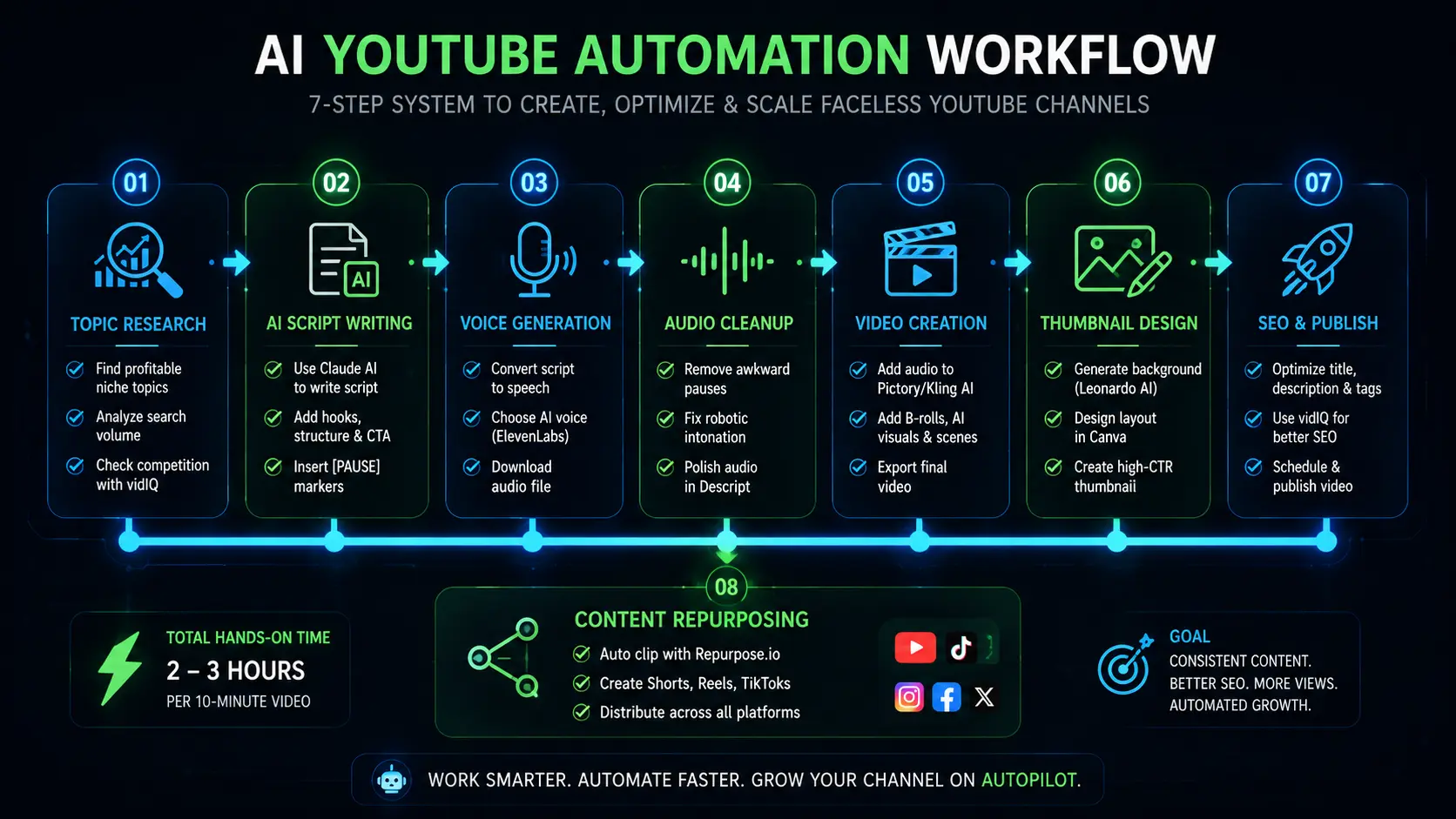
Here’s how all these tools connect in practice:
Step 1 — Find the Topic
Use vidIQ to find a keyword with decent search volume and low competition in your niche.
Step 2 — Write the Script
Feed the topic, target audience, and tone into Claude AI. Ask for a structured script with hook, body, and CTA. Add [PAUSE] markers where needed.
Step 3 — Generate the Voiceover
Paste the script into ElevenLabs. Choose your voice, download the audio file.
Step 4 — Clean the Audio
Drop the audio into Descript. Delete any awkward lines, long pauses, or robotic-sounding phrases.
Step 5 — Build the Video
Import the cleaned audio into Pictory or assemble it manually with Kling AI clips for custom visuals.
Step 6 — Design the Thumbnail
Generate a background in Leonardo AI. Add text and layout in Canva.
Step 7 — Optimize and Publish
Write the title, description, and tags using vidIQ’s keyword data. Schedule the video.
Step 8 — Repurpose
Let Repurpose.io clip and distribute the content across all your other platforms automatically.
Total hands-on time per video once this system is running: about 2 to 3 hours. Most of that is the script review and thumbnail.
Cost of AI Tools for YouTube Automation
Here’s a realistic breakdown for a channel publishing 2–3 videos per week:
| Tool | Plan | Monthly Cost |
|---|---|---|
| Claude AI | Pro | $20 |
| ElevenLabs | Starter | $5 |
| Pictory | Standard | $19 |
| Leonardo AI | Free / Apprentice | $0–$10 |
| vidIQ | Basic | $7.50 |
| Descript | Creator | $24 |
| Repurpose.io | Marketer | $25 |
You don’t need to start with all of these. Begin with Claude (free), ElevenLabs (free), and vidIQ (free). Once your channel is growing, add tools one at a time.
Common AI Tools for YouTube Automation Mistakes
Using AI output without reviewing it. AI scripts and voiceovers are a starting point, not the final product. Always do a single read-through before the video goes live.
Picking a niche with no monetization potential. Automation can scale a channel fast — but it can also scale a channel in a worthless niche just as fast. Research RPM (revenue per thousand views) before committing to a topic category.
Skipping the thumbnail. This is where most faceless channels quietly fail. Spend time on thumbnails. They matter more than the video quality in most niches.
Ignoring the first 30 seconds. AI-generated videos tend to have slow intros. Cut anything before your actual hook. Viewers decide in under 10 seconds whether to stay.
FAQ
Yes, but the channels that are making money are the ones treating it like a business. A solid niche, consistent output, and decent thumbnail/SEO work is still a reliable formula. The channels that fail are the ones producing generic content at scale and expecting the algorithm to figure it out.
You can test the concept for free using Claude’s free tier, ElevenLabs’ free tier, vidIQ’s free plan, Leonardo AI’s free credits, and Canva’s free. You won’t be able to scale for free long-term, but you can validate whether your niche works before spending anything.
As of 2025, yes — as long as the content provides genuine value and isn’t repetitive/spammy. YouTube requires you to disclose AI-generated content in certain categories (news, politics, health). For most entertainment and educational niches, there’s no required disclosure, but it’s good practice to mention it.
Finance, tech explainers, history, true crime, and self-improvement have the highest RPM and consistent search demand. Avoid oversaturated general niches. Find a specific angle — “AI tools for small business owners” beats “AI tools” every time.
With a working system in place, most creators report 2–3 hours per video for a 10-minute piece. The first few videos will take longer while you’re learning each tool. By video 10, you’ll have a rhythm.
🔒 Secret Section: GitHub Tools Most People Don’t Know About
These tools are free, open-source, and sitting on GitHub right now. Most people in the “YouTube automation” space have never heard of them.
This is a fully automated YouTube channel management tool with AI agents that creates, optimizes, and publishes videos 24/7. It works with the free Gemini API or OpenAI and requires no coding skills.
This is the closest thing to a “set it and forget it” channel manager that exists for free right now. You configure your niche, connect your YouTube account, and the agent handles topic research, scripting, and publishing on a schedule. If you’re comfortable following a GitHub README, this is worth setting up.
2. AI-Faceless-Video-Generator (by SamurAIGPT)
🔗 github.com/SamurAIGPT/AI-Faceless-Video-Generator
This tool generates talking face videos from just a topic using AI. It combines script generation, text-to-speech, and face animation to create complete videos automatically. You can run it via a Jupyter notebook.
Great for creators who want AI avatar-style videos without paying Synthesia’s premium pricing. Requires a bit of Python setup, but the README walks you through it.
3. awesome-faceless (by sasharun)
🔗 github.com/sasharun/awesome-faceless
A curated list of 50+ AI tools for faceless YouTube content creators covering voice, video, editing, automation, and more. Contributions are welcome, and the list is maintained under a CC0 license.
Think of this as a living, community-updated directory of every useful tool in this space. Real creators update it and don’t have the SEO-optimized bias that most blog posts do. If you want to discover tools that haven’t been written about yet, this GitHub repo is where to look.
4. Cauldron (by Statwarts)
🔗 github.com/Statwarts/Cauldron
Cauldron is a powerful open-source video engine designed to help content creators automate their YouTube channels, producing high-quality videos without ever showing their faces. It supports automated video creation from scripts or text input, and includes voiceover integration through text-to-speech.
It’s MIT-licensed, which means you can modify it however you want. If you’re technically inclined and want to build a custom pipeline rather than pay for SaaS tools every month, Cauldron is a solid starting point.
5. automate-faceless-content (by cporter202)
🔗 github.com/cporter202/automate-faceless-content
This resource covers how to automate faceless short-form and long-form video content to dominate YouTube, TikTok, Facebook, and Instagram on autopilot – from idea to script to video to scheduled posts — with a claimed 70% reduction in content creation time.
More of a blueprint than a tool, but it’s one of the most practical GitHub repos for understanding how to connect all these pieces into a system rather than just a collection of apps.
The biggest advantage of using AI tools for YouTube automation is speed without sacrificing consistency.
Conclusion — Tools Are the Easy Part, Systems Are the Hard Part

You can spend $200 on tools and still not have a working YouTube automation channel. The tools listed in this guide are only as good as the system you build around them.
The creators who succeed with faceless YouTube automation do one thing differently: they treat their channel like a small media company with a production pipeline, not like a side project they’ll figure out as they go.
Start with three tools – Claude, ElevenLabs, and vidIQ. Build one video. Learn the workflow. Then add tools one at a time as you identify your specific bottleneck.
If writing takes too long, add a better script tool. If your visuals look generic, add Kling AI. If distribution is slow, add Repurpose.io. Build the system around your actual problems, not around what every YouTube course tells you to buy.
The tools are ready. The only missing piece is the commitment to build the system.
Explore more AI tool reviews and deep-dives at napnox.com